Quarter Quell Bracket
48-Tribute Hunger Game Simulator Mode
Run four tributes per district across all twelve districts with Quarter Quell pacing, faster auto-play rounds, and clean stalemate breakers.
Running a 48-tribute Hunger Game Simulator doubles the classic twenty-four contestant format into four tributes per district—mirroring the chaotic scale of a Quarter Quell arena. Instead of trimming your Discord server, classroom roster, or favorite crossover fandom down to half the cast, you can drop up to forty-eight names onto the pedestals at once and watch massive early alliances clash at the Cornucopia.
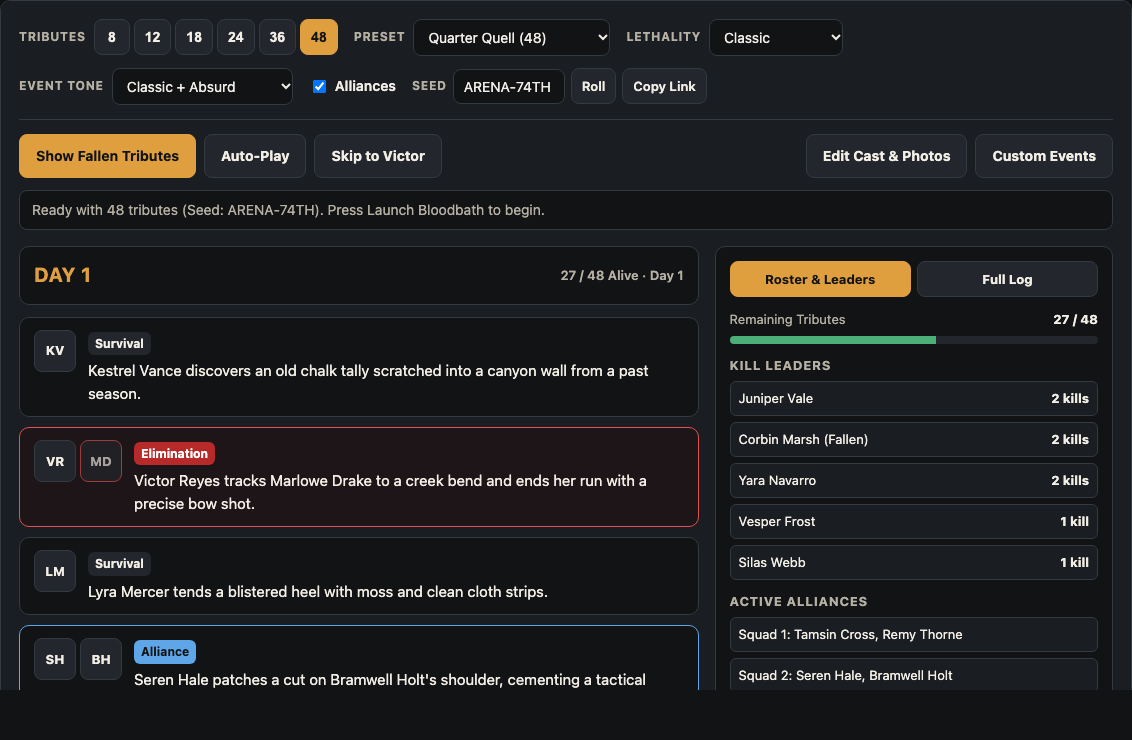
To launch straight into a 48-player bracket, head to the Hunger Game Simulator and either click 48 on the size toolbar or choose Quarter Quell (48) in the preset dropdown.
Why 48-tribute pacing needs dynamic lethality
Doubling the roster breaks naive simulator math. If an engine uses static day-by-day death odds tuned for twenty-four contestants, a 48-tribute game either drags past thirty monotonous days or stalls indefinitely when the final five survivors keep hiding in separate corners of the map. Waiting through twenty straight phases of tributes gathering firewood kills the energy of a Discord call or live stream.
This simulator balances 48-player seasons in three ways:
- Explosive Bloodbath opening: Roughly a third of early skirmishes happen during the opening sprint, trimming crowded districts cleanly while spotlighting multi-elimination moments and early alliances.
- Scheduled Feast & Gamemaker spikes: Day 3 triggers the first Gamemaker hazard (such as Acid Fog, Tracker Wasps, or Mechanical Hounds) and Day 4 opens the Feast—forcing tucked-away squads out of cover.
- Late-game lethality ramp: Past Day 8 and whenever four or fewer tributes survive, survival odds tighten automatically so the final showdown delivers dramatic eliminations instead of endless berry-foraging loops.
How to organize 48 contestants cleanly
Entering forty-eight characters one input box at a time is tedious. Use the bulk paste box inside Edit Cast & Photos to build your whole bracket in seconds:
- Prepare a plain list of up to 48 lines in Notes or a spreadsheet.
- Optionally specify districts and pronouns using vertical bars:
Character Name | 7 | she. Any line without pipes assigns districts sequentially (four tributes per district across Districts 1–12) and applies a balanced default pronoun. - Click Apply Roster to populate all 48 cards immediately, then hit Shuffle Districts if you want randomized pairings.
- Click Export JSON once your 48-person cast is ready. Exporting gives you a lightweight backup file you can reload next week without re-typing names or re-uploading portraits.
Need help formatting portraits or fixing local photos? See our Custom Cast & Portrait Guide.
Hosting 48-tribute nights on Twitch, YouTube, or Discord
Big brackets shine when everyone can track their favorite underdog across dozens of eliminations. Before sharing your screen on a stream or voice channel, try these hosting tips:
- Use the Roster & Leaders sidebar: Keep the Remaining Tributes bar and Kill Leaders panel visible while narrating. Viewers can spot who is streaking ahead in kills and which districts still have full squads alive.
- Filter the Full Log by tribute: If a viewer joins late and asks how their character died on Day 2, switch to the Full Log tab, select their name from the dropdown, and read every moment they participated in—from Bloodbath loot grabs to their final clash.
- Lock a replay seed for community tournaments: Copy the Seed link before launching the Bloodbath if you want subscribers to verify outcomes or rerun the exact bracket at home.
- Add 4–6 custom inside-joke events: Drop a few server memes into Custom Events (such as someone getting distracted by an unmuted mic) so a massive 48-player roster produces moments tailored specifically to your community.
- Practice a dry run with Skip to Victor: Before going live, run one quick test seed with Skip to Victor and inspect the Tribute Board to make sure every custom name spells cleanly and no duplicate nicknames slip into the same district.
Choosing the right settings for streams vs quick games
Depending on whether you are narrating live or speed-running brackets in a chat thread, pick the matching lethality and tone combination before launching:
| Use Case | Recommended Size | Lethality | Event Tone | Expected Length |
|---|---|---|---|---|
| Livestream / Watch Party | 48 Tributes | Classic | Classic + Absurd | ~8–11 Days (narrated) |
| Fast Group Chat Bracket | 48 Tributes | Carnage | Max Comedy & Chaos | ~5–7 Days (rapid) |
| Roleplay / Serious Canon | 48 Tributes | Low | Pure Survival | ~12–16 Days (slow burn) |
Wait until everyone places their predictions on which District finishes first before switching on Auto-Play. Even in a forty-eight contestant bracket, watching alliances unravel across Days 3 and 4 usually sparks the biggest reactions in chat when a dark-horse tribute steals three eliminations at the Feast.
If you want viewers to follow along on their own screens, copy the Seed link before clicking Launch Bloodbath. Anyone opening that URL with the same cast and settings will witness the exact same eliminations, Feast pulls, and final Victor. After the final cannon fires, click Download Victor Card (PNG) to drop a 1200×675 summary graphic straight into your Discord server or community tab. For a closer look at how custom lines and arena disasters mix into the log, visit the Arena Events guide.
FAQ
Common questions
How do I launch 48-tribute mode immediately?
Click the 48 button along the top bar of the simulator or select Quarter Quell (48) from the Preset menu. Every district from District 1 through District 12 automatically receives four tribute slots.
How long does a 48-player match take to finish?
Under Classic lethality, a 48-tribute round usually takes 7 to 12 in-game days—about two minutes on manual clicks or roughly 25 seconds with Auto-Play. Switching Lethality to Carnage cuts most matches to 5 or 6 days.
Can I upload 48 custom names and photos at once?
Yes. Open Edit Cast & Photos, paste up to 48 lines into the bulk roster box, and click Apply Roster. You can upload local photos per tribute and click Export JSON to save the whole 48-character set as one portable file.
Why do 48-tribute rounds sometimes stall in other simulators?
Simulators with flat kill probabilities slow down once fewer than eight players remain. This engine scales lethality upward after Day 8 and automatically injects Feast and Gamemaker Arena Events so every 48-player game reaches one Victor cleanly.